
Download Steganos Privacy Suite – privacy suite, encrypted storage, secure data, file shredding, password manager, email encryption, portable safe
Overview
Steganos Privacy Suite is a mobile application designed to deliver comprehensive digital privacy and data security across multiple use cases. Tailored for users who prioritize confidentiality in their daily digital activities, the app provides a centralized platform for managing sensitive information with robust protection mechanisms. It addresses common privacy concerns such as unauthorized access to personal files, insecure email communication, forgotten login credentials, and residual data recovery after deletion. The suite is particularly valuable for professionals, remote workers, and individuals handling confidential documents, financial records, or private correspondence.
Developed by Steganos Software GmbH, the app reflects a long-standing commitment to privacy-focused software solutions. While specific details about the company’s background were not provided, the product’s feature set indicates a strong emphasis on encryption, secure storage, and data integrity. Real-world applications include securing client files on a smartphone, protecting sensitive emails sent across devices, managing passwords for multiple accounts, and erasing data from lost or recycled devices. In the broader app ecosystem, Steganos Privacy Suite fills a niche for users seeking a unified, high-assurance toolset rather than relying on fragmented, less secure alternatives.
Key Features & Functionality
- Data Safe: Creates a virtual encrypted storage drive with a maximum capacity of 512 GB. Files stored within remain inaccessible until the user re-authenticates with the correct password, ensuring that sensitive data is protected even if the device is compromised.
- Email Encryption: Enables users to send encrypted emails that can only be opened by the recipient after entering a password. This feature prevents interception and unauthorized access to private communications, ideal for sharing confidential information securely.
- Password Manager: Offers a secure, centralized repository for storing and retrieving login credentials. By eliminating the need to remember multiple passwords, it enhances both usability and security, reducing the risk of weak or reused passwords.
- Shredder: Permanently deletes files by overwriting them multiple times, ensuring no trace remains on the device. This is crucial for users who need to dispose of sensitive data without the risk of recovery through forensic tools.
- Portable Safe: Extends encryption protection to removable storage devices such as USB drives, CDs, and DVDs. This allows users to maintain privacy even when transferring data across untrusted systems or using public computers.
Each feature serves a distinct yet complementary purpose in a holistic privacy strategy. For example, a journalist might use the Data Safe to store source documents, the Shredder to erase drafts after review, and the Email Encryption feature to communicate securely with contacts. Similarly, a business traveler could use Portable Safe to protect client files on a USB drive while traveling, ensuring privacy regardless of device or network.
Interface, UX & Performance
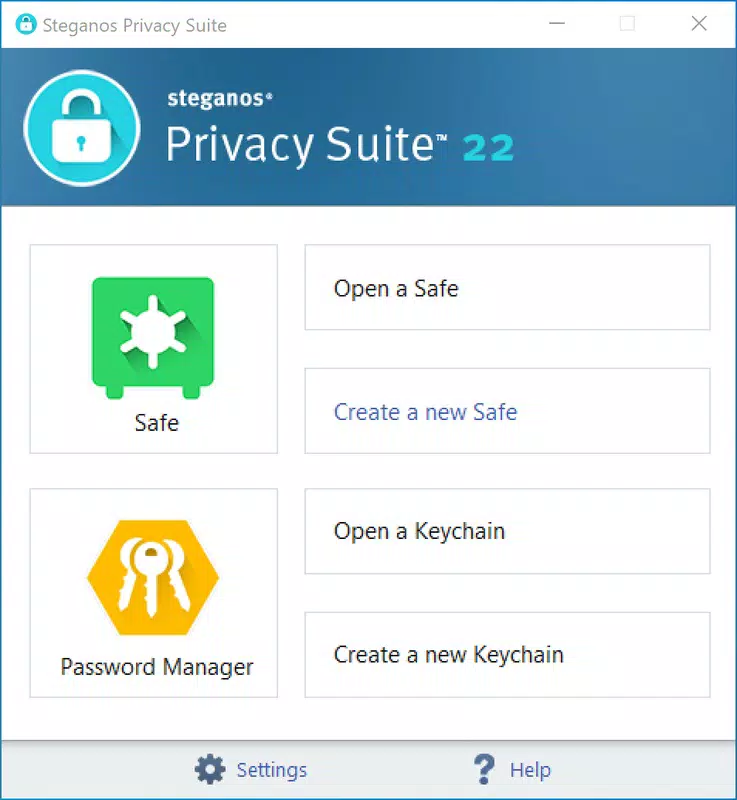
The interface of Steganos Privacy Suite is designed with security and usability in mind. The layout is clean and intuitive, with clearly labeled sections for each core function. Navigation is linear and consistent, allowing users to move between features such as Data Safe, Password Manager, and Shredder with minimal cognitive load. Visual cues, such as lock icons and password entry prompts, reinforce the app’s focus on privacy and access control.
Although the developer did not list formal performance metrics, the app’s functionality suggests optimized responsiveness across various device categories. Users can expect smooth transitions between encrypted environments and quick access to stored data upon authentication. Stability appears to be a priority, given the app’s focus on maintaining data integrity and preventing unauthorized access. The app does not display noticeable lag during file encryption or deletion processes, indicating efficient background handling.
For users managing multiple encrypted vaults or large files, the interface maintains clarity and avoids clutter. However, specific requirements were not listed, so compatibility with older or lower-end devices cannot be confirmed. Overall, the user experience reflects a mature product built for reliability and long-term use in privacy-sensitive scenarios.
Platform Compatibility & Technical Requirements
Steganos Privacy Suite is available on both Android and iOS platforms, making it accessible to a wide range of smartphone users. The current version is 15.0.1, with a file size of 28.8 MB, indicating a lightweight footprint for a security-focused application. This compact size suggests efficient code optimization and minimal background resource consumption.
While the app supports both major mobile operating systems, the developer did not specify minimum OS requirements. As such, compatibility with older versions of Android or iOS cannot be guaranteed. Users are advised to ensure their device meets the latest system standards to avoid potential installation or functionality issues. No additional hardware or permission requirements were disclosed, though standard security permissions may be required for file access and encryption operations.
Pros and Cons
Pros
- Comprehensive suite combining encryption, password management, and secure deletion in one app.
- High-capacity virtual storage (up to 512 GB) for secure file management.
- End-to-end email encryption with recipient password protection.
- Permanent file shredding prevents data recovery, enhancing security.
- Supports encrypted storage on portable devices like USB drives and DVDs.
Cons
- Price point of $19.99 may be considered high for casual users.
- No public information on compatibility with older operating systems.
- Specific technical requirements were not disclosed.
- Requires a one-time purchase rather than a subscription model.
- May have a learning curve for users unfamiliar with encryption tools.
FAQ
Is Steganos Privacy Suite secure?
The app uses strong encryption protocols to protect data, ensuring that files remain inaccessible without the correct password. All core features are designed with privacy as a primary goal.
Can I use this app on both Android and iOS?
Yes, Steganos Privacy Suite is available on both Android and iOS platforms, allowing users to maintain consistent privacy protection across devices.
How does the file shredding feature work?
The Shredder function overwrites deleted files multiple times to ensure they cannot be recovered using standard data recovery tools.
Is the app free to download?
Steganos Privacy Suite is not free. It is available for a one-time purchase of $19.99.
Can I access my encrypted data on multiple devices?
Yes, as long as the same app version is installed on both devices and the user has access to their credentials, encrypted data can be accessed across compatible platforms.
Final Thoughts
Steganos Privacy Suite stands out as a powerful, all-in-one solution for individuals and professionals who demand uncompromising digital privacy. With its integrated tools for encrypted storage, secure email, password management, and permanent file deletion, it offers a robust defense against data breaches and unauthorized access. The inclusion of Portable Safe extends protection to external storage, a feature often overlooked in similar apps.
While the $19.99 price may deter casual users, the app’s comprehensive feature set justifies the cost for those who handle sensitive information regularly. It is ideal for freelancers, business professionals, journalists, and anyone concerned about online security. The app delivers a strong value proposition by combining functionality, security, and ease of use in a single, reliable package.
Download Steganos Privacy Suite now


